A reading challenge is a set of book titles in your catalogue that you want to promote. It is generally used to encourage reading by attempting to meet the "challenge". It could be a formal challenge sourced from an external educational jurisdiction or authority (eg. PRC, or it could be a custom challenge created by the librarian. Each challenge is "virtual" and is created by importing an easily formatted CSV file.
Import an External Reading Challenge
Go to: Cataloguing > Bulk Update > Reading Challenge
Note: Only one challenge can be run at a time and each challenge is virtual meaning does not impact the bibliographic records in your catalogue.
For each authority type you can perform the following actions to achieve the described result:
- Note the CSV File expected in format.
- ISBN - used to identify a specific title in your catalogue. Note: ISBNs in the file and not in your catalogue will be ignored.
- Challenge - name of the challenge. Note: Only one challenge can be supported at a time.
- Year - the calendar year this challenge will be run. Note: To aggregate a new challenge with an earlier challenge, add the new titles to the previous CSV file.
- Booklist - displays a reading suitability for the title.
- Reading Challenge File - choose the CSV file from your local computer.
 - import the file to create a virtual challenge list for your catalogue. Note: Titles in your catalogue that match ISBNs in your CSV file will be matched and a summary report will display. Import and processing time depend on the number of records in both your collection and the CSV file.
 - After processing, a report will display successful (green) and unsuccessful (red) matches.
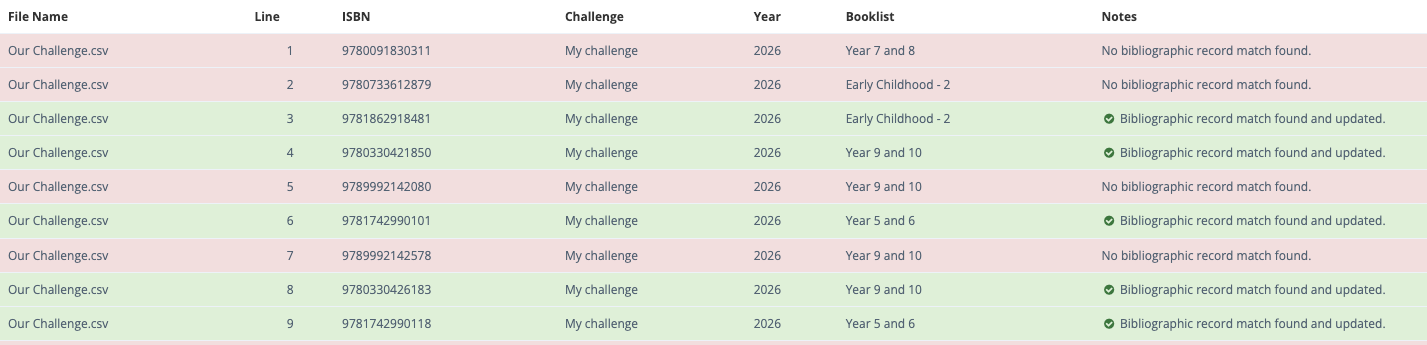
Note: Replace a current challenge list by importing a new challenge list.
Import a Custom Reading Challenge
- Prepare a bibliographic report to of titles to meet the requirements of your custom challenge.
- Export the report as a CSV file as instructed.
- Edit the CSV file to match the format as described in Step 1 above.
 - import your custom file to create a virtual challenge list of the titles in your catalogue. Note: Because you have created the custom challenge by exporting records from your catalogue, all ISBNs in your CSV file will be match titles in your catalogue. Import and processing time depend on the number of records in both your collection and the CSV file.
- After processing, the report should display all imports as successful (green).
Note: If you want to have multiple custom challenges to cycle through during the academic year, or from academic year to academic year, keep the CSV file for each challenge or save the challenge report and rerun it as required.
OPAC Display
Regardless of the type of challenge, titles found in an OPAC search will display on the results page as either:
- a message -
 on the single line detailed display, or
 - an icon -
 on both tile cover displays.