The library manager can choose to anonymise circulation history, i.e., patron historical loan records, to ensure patron loans are managed in line with school policy. Anonymising circulation behaviour will impact patron loan statistics and may impact statistical analysis of collection usage.
Note: Anonymising circulation behaviour will by definition, destroy data about about individual patron borrowing activity and borrowing patterns over time. If your library policy is to not anonymise loan history and your policy changes in the future to anonymise loan history, you are required to submit a support ticket in the usual way to request the technical changes required to support your new policy. While it is possible to easily reverse school policy it is not possible to recapture anonymise historical loan data.
Configure Anonymous Circulation Counts
The configuration of anonymous circulation and count loans will impact the types of reports that can be generated.
Go to: Configure > Settings > Circulation > Anonymous Counts
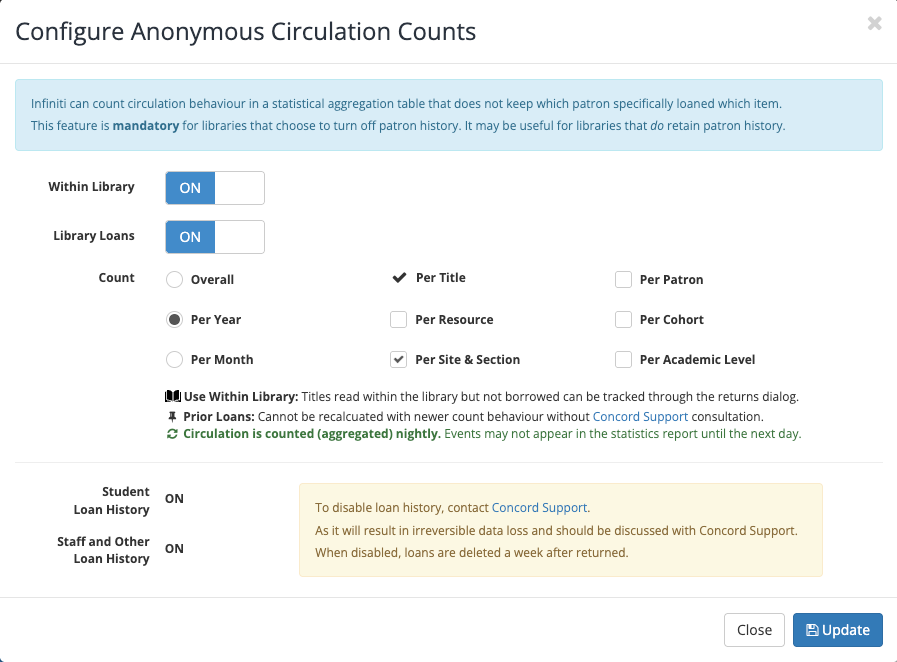
- Loan Counts
- Within Library - select
 to allow library staff to quickly scan, count, and record books used within the library, for future statistical analysis and reporting, as they re-shelve these items using the normal return or check-in dialog. Note: These counts are by definition anonymous, because the items are not passed through the normal circulation.
 - Library Loans - selectto gather and store counts for recorded library loans:
- Overall - count loans across all time.
- Yearly - count loans year-by-year.
- Monthly - count loans month-by-month. Note: This will be a more granular or refined count than an overall or yearly.
- Per Title - mandatory count on the number of times a unique title is borrowed.
- Per Resource - optionally count of the number of times a unique item is borrowed.
- Per Site & Section - optionally count of the number of times a unique item is borrowed by Site and Section.
- Per Patron - optionally count of the number of items borrowed by each patron.
- Per Cohort - optionally count of the number of items borrowed by each cohort.
- Per Academic Level - optionally count the number of items borrowed by each academic level.
- Within Library - select
- Student Loan History -
 by default - all students' loan histories are retained indefinitely until set OFF, or
 by request - all students' loan histories are purged 1 week after check-in or return
- Staff and Other Loan History
- by default - all staff and other loan histories are retained indefinitely until set OFF, or
- by request - all staff and other loan histories are 1 week after check-in or return
Note: Please submit a support ticket in the usual way to request changes to either student loan history or staff loan history settings.